On-premises AI vs cloud: where should an asset manager run AI?
On-premises AI vs cloud for asset managers: weigh control, records, backup, security, cost and upkeep, what to ask about any box, and when your own cloud wins.
- What are the options for hosting an AI agent at an asset manager?
- Which criteria decide between on-premises and cloud AI?
- What do books and records rules mean for where an AI agent runs?
- What should you ask about any proposed AI hardware?
- Is a single machine a single point of failure?
- When is cloud in your own tenant the better answer?
- How do on-premises and cloud AI costs compare?
- A decision table: on-premises or cloud?
- How Alpheous runs on your own hardware
- FAQ
- Sources
In this article
- What are the options for hosting an AI agent at an asset manager?
- Which criteria decide between on-premises and cloud AI?
- What do books and records rules mean for where an AI agent runs?
- What should you ask about any proposed AI hardware?
- Is a single machine a single point of failure?
- When is cloud in your own tenant the better answer?
- How do on-premises and cloud AI costs compare?
- A decision table: on-premises or cloud?
- How Alpheous runs on your own hardware
- FAQ
- Sources
An asset manager can run an AI agent well on its own hardware or in the cloud; the deciding question is who controls the data, the records and the keys, not where the server sits. Hardware in your office gives you the most direct custody, but only if it comes with offsite encrypted backups, a stated recovery time and someone accountable for upkeep. A cloud deployment in your own tenant is the better answer when your firm already runs that way and has the people to operate it. A vendor's shared cloud is the option that gives you the least control of all.
What are the options for hosting an AI agent at an asset manager?
The question usually gets framed as "on-premises vs cloud", but there are three distinct models:
- Vendor multi-tenant SaaS. The vendor runs one platform for many customers in its own cloud account. Your data sits beside other firms' data, separated by software. You hold a login, not the infrastructure.
- Cloud in your own tenant. The software runs in your firm's own AWS, Azure or Google Cloud account. You own the account, the billing and the access policies; the vendor, or your IT team, deploys and operates it there.
- On-premises appliance. A dedicated machine your firm owns runs the agent inside your office, for your firm only. The agent still calls outside services (your CRM, your mail system, an AI model provider), but the working data and records live on hardware you control.
The real debate is between the second and third: both put your firm in control, and differ in who carries the operational load.
Which criteria decide between on-premises and cloud AI?
Six criteria do most of the work. None is a single right answer; each is a question about who is accountable.
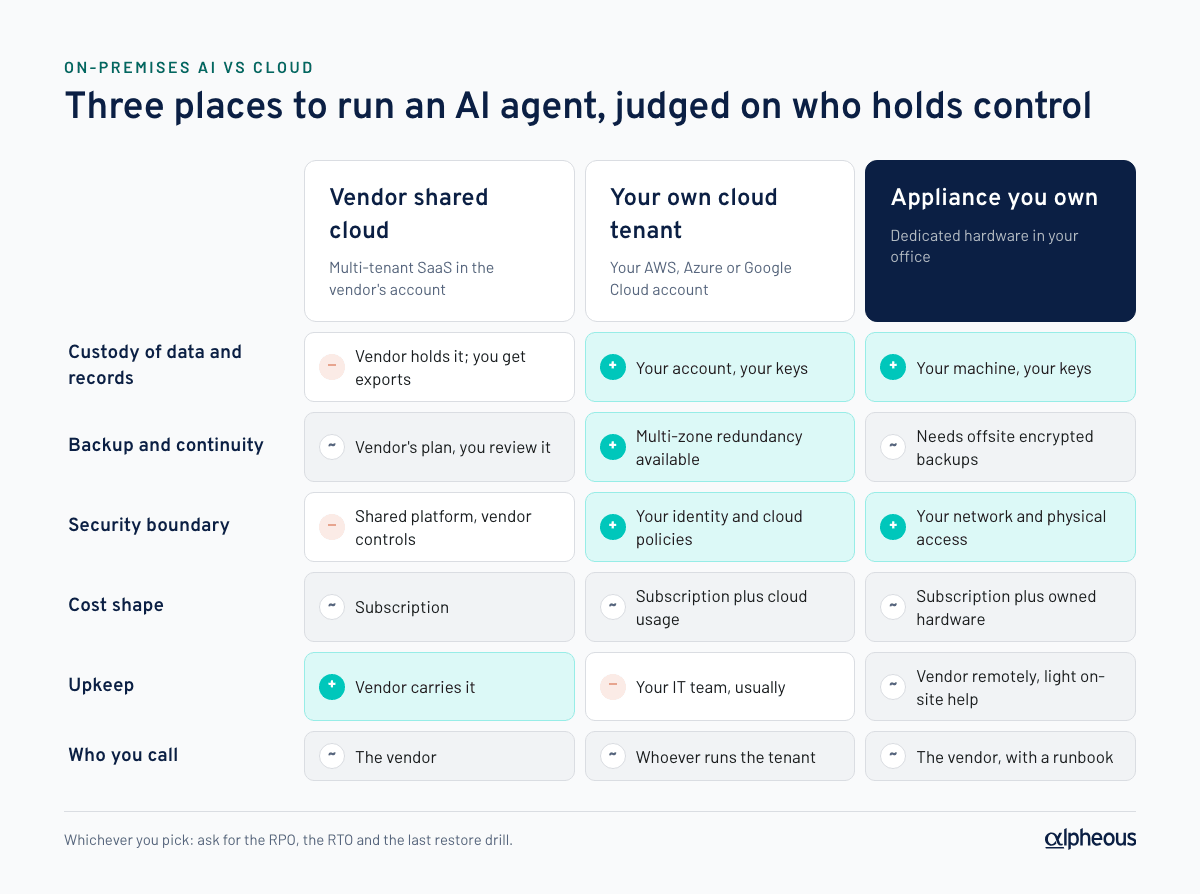
| Criterion | Vendor shared cloud | Cloud in your own tenant | Appliance on your hardware |
|---|---|---|---|
| Custody of data and records | Vendor holds it; you get exports | You hold the account and keys | You hold the machine and keys |
| Backup and continuity | Vendor's plan, which you review | Your plan, with cloud redundancy available | Your plan; offsite backups are essential |
| Security boundary | Shared platform, vendor controls | Your cloud policies and identity | Your office network and physical security |
| Cost shape | Subscription | Subscription plus cloud usage | Subscription plus hardware you own |
| Upkeep | Vendor | Your IT or the vendor, in your account | Vendor remotely, plus a little on-site help |
| Who to call when it breaks | The vendor | Whoever operates the tenant | The vendor, with a named runbook |
The row that matters most for regulated firms is the first. Ask, for each option: if the vendor disappeared tomorrow, could you still produce every record the agent created?
What do books and records rules mean for where an AI agent runs?
Registered investment advisers keep required records under Advisers Act Rule 204-2. Most must be kept "in an easily accessible place" for at least five years, the first two in an appropriate office of the adviser. Records kept electronically must be arranged so any record can be located and retrieved, a duplicate must be stored separately, and the adviser must have procedures to safeguard them "from loss, alteration, or destruction" and to limit access to authorized personnel (Rule 204-2(g)). Broker-dealers keep records under Exchange Act Rules 17a-3 and 17a-4, and FINRA Rule 4370 requires a written business continuity plan that addresses data back-up and recovery.
None of these rules says "on-premises" or "cloud". They say records must be retrievable, protected and duplicated. Any hosting option can meet that; what changes is who does the work and who you rely on. For the email side specifically, see archiving AI-drafted emails. If the agent also works with data you license from a vendor, check where that data may be stored and processed too (see licensed data and AI tools).
Privacy rules point the same way. The 2024 amendments to Regulation S-P require brokers, funds and registered advisers to run an incident response program, to notify affected individuals no later than 30 days after becoming aware of unauthorized access to sensitive customer information, and to oversee service providers so they report a breach to the firm within 72 hours (SEC small entity compliance guide). Larger entities had to comply by December 3, 2025 and smaller entities by June 3, 2026. Every outside party the AI agent depends on is a service provider to think about under that rule.
This is not legal or compliance advice; confirm how these rules apply to your firm with your CCO.
What should you ask about any proposed AI hardware?
If a vendor proposes a box in your office, four questions separate a serious appliance from a liability. Ask them in writing.
- What is it? Make, model, storage, and whether the disk is encrypted at rest. Who owns the hardware: you, or the vendor on loan? Is it dedicated to your firm, or shared?
- Where does it sit? Which room, on which network segment, with what physical access control. Does it need any inbound firewall ports opened, or does it connect outbound only? What happens when the office loses power or internet?
- How is it backed up? How often, to where, encrypted with whose key, and how long a restore takes. Ask for the last restore drill result, not the policy.
- Who maintains it? Who patches the operating system and the software, how updates arrive, who watches it overnight, and what a person in your office is expected to do if it fails.
Is a single machine a single point of failure?
Yes. One machine in one office can fail: a disk, a power supply, a flooded room. Pretending otherwise is the most common weakness in on-premises pitches; the honest answer is to plan for the failure.
Two terms make the plan concrete. RPO (recovery point objective) is how much recent data you could lose, measured in time since the last good backup. RTO (recovery time objective) is how long it takes to be working again. A serious appliance states both.
The controls that make one machine acceptable:
- Offsite encrypted backups, frequent and automatic, to storage in the firm's own account. Encrypt before the data leaves the machine, with a key your firm holds, so the storage provider (and the vendor) cannot read it.
- A stated RPO and RTO, with a separate RTO for the case where the hardware itself must be replaced.
- Recorded restore drills. A backup nobody has restored is a hope, not a control.
- Out-of-band power control, so a hung machine can be power-cycled remotely without someone walking to the closet. A cellular link keeps that working when the office internet is down.
- A UPS, so a short power blip does not become a corrupt disk.
- Monitoring around the clock, so the vendor knows the machine is down before your sales team does.
It also helps to be clear about what the agent does. A prospecting and drafting agent that is down for a day delays a call list; it does not stop trading or client servicing. Your continuity plan should size the response to that.
When is cloud in your own tenant the better answer?
Cloud in your own tenant usually wins when:
- Your firm is already cloud-first. If your IT team runs workloads in your own AWS, Azure or Google Cloud account with identity, logging and backup policies in place, adding one more workload there is natural, and an office box would be the odd one out.
- You have no suitable office space. A fully remote team, a serviced office or a building that will not allow equipment on its network makes on-premises awkward.
- You need high availability. If the agent will support something time-critical, cloud redundancy across zones is easier to buy than to build in an office.
- You have the people. Someone at your firm, or a managed service provider you already trust, must own patching, access reviews and cost monitoring in that account.
The thing to avoid is the vendor's shared cloud described as "your cloud". Ask whose account the servers run in and who receives the bill. If the answer is the vendor, it is SaaS, whatever the slide says.
How do on-premises and cloud AI costs compare?
There is no honest single number, because the costs land in different places:
- Hardware. An appliance is a capital purchase plus power and a sliver of office space. Cloud is a monthly bill that grows with compute and storage.
- AI model usage. Calls to a model provider cost the same per token wherever the agent runs. If you bring your own model keys, that bill comes to you directly either way (see AI token costs and model routing).
- Operations. Someone's time goes into patching, monitoring and access reviews. With an appliance, ask how much of that the vendor carries. In your own tenant, it is usually your IT team.
- Exit. Ask what it costs to leave: exporting records, decommissioning a box, or tearing down a tenant.
Compare total cost over several years, people time included, not the first invoice.
A decision table: on-premises or cloud?
| If this is true at your firm | Lean toward |
|---|---|
| You want records and keys physically under your control | Appliance on your hardware |
| IT already operates your own cloud tenant well | Cloud in your own tenant |
| No IT staff, and you want the vendor to carry upkeep | Appliance with vendor monitoring, or vendor SaaS |
| Fully remote team, no office equipment | Cloud in your own tenant |
| The agent must stay up through a site outage | Cloud in your own tenant, multi-zone |
| You cannot get clear answers on backup, RPO and RTO | Neither, until you can |
The last row matters most. The hosting model is a means; recoverable, auditable records under your control are the end.
How Alpheous runs on your own hardware
Alpheous is built as a single-tenant appliance: one firm per machine, on hardware the firm owns, in its own office. Every outside provider it uses (CRM, mail, AI model provider, backup storage) runs on the firm's own account and billing.
- Backups: hourly, client-side encrypted, to the firm's own bucket. RPO is one hour; RTO is 24 hours in place, or 48 to 72 hours if the hardware must be replaced. Restore drills are recorded.
- Resilience: each appliance ships with a UPS and a cellular out-of-band power controller, and the fleet is monitored around the clock.
- Security: data is encrypted at rest, credentials live in the machine's keychain, and surfaces are reached through a Cloudflare tunnel with no inbound ports.
- Records: every action touching client data, communications or decisions records who, what and when, stays on the appliance and can be exported.
The security overview, BCP and shared responsibility matrix are in our trust center. For the controls any agent should meet, see the AI agent security checklist. Take the tour or book a call.
FAQ
Is on-premises AI more secure than cloud AI?
Not automatically. On-premises gives you direct custody of data and keys, but it is only as secure as its patching, network setup, physical access and backups. A well-run cloud tenant your firm controls can be just as secure; a vendor's shared cloud gives you the least control.
Can an asset manager keep books and records on an on-premises AI system?
Yes, provided the records are retrievable, protected from loss and alteration, access-limited and duplicated separately, as Rule 204-2(g) requires of advisers' electronic records. That means offsite backups and a tested restore, not just a local disk. Confirm the specifics with your CCO.
What is a reasonable RPO and RTO for an AI prospecting agent?
It depends on what the agent supports. For prospecting and drafting, losing at most an hour of data and recovering within a day or two is typical, because an outage delays sales work rather than client servicing. Whatever the numbers, ask for them in writing and for the last restore drill.
When should an asset manager choose cloud over on-premises AI?
When the firm is already cloud-first, has staff or a managed provider operating its own cloud tenant, works without suitable office space, or needs the agent to survive a site outage. In those cases, cloud in the firm's own tenant is usually the better home.
Sources
- Advisers Act Rule 204-2 (ecfr.gov)
- Rule 4370 (finra.org)
- SEC small entity compliance guide (sec.gov)

Dave founded Alpheous in 2026 after years of building technology platforms and seeing the same operational bottlenecks across asset management distribution teams.
Dave Ward on LinkedInMore in AI prospecting
How to archive AI-drafted sales emails for SEC and FINRA
Archive AI-drafted sales emails by having a person send them from a firm mailbox your archive already captures, and keep the draft and approval trail.
Can AI personalize a compliance-approved email template?
Yes, if the principal approves the template and the rules for each AI-filled field, and the fills cannot change what the email claims. Here is how to design it.
AI token costs for prospecting: model routing and your own keys
AI token costs for sales prospecting, explained: October 2026 list prices, a worked cost per prospect, model routing math, and six questions to ask vendors.
Alpheous reads the filings every night and ranks who to call next.